MariaDB Data Source
Introduction
MariaDB is a community-developed, commercially supported open-source relational database that is a drop-in replacement for MySQL. This topic explains how to connect to MariaDB data sources in your Reveal application to visualize and analyze your data.
Server Configuration
Installation
- ASP.NET
- Node.js
Step 1 - Install the Reveal MariaDB connector package
For ASP.NET applications, you need to install a separate NuGet package to enable MariaDB support:
dotnet add package Reveal.Sdk.Data.MariaDB
Step 2 - Register the MariaDB data source in your application:
builder.Services.AddControllers().AddReveal(builder =>
{
    builder.DataSources.RegisterMariaDB();
});
For Node.js applications, the MariaDB data source is already included in the main Reveal SDK package. No additional installation is required beyond the standard Reveal SDK setup.
Connection Configuration
- ASP.NET
- Node.js
- Node.js - TS
// Create a data source provider
public class DataSourceProvider : IRVDataSourceProvider
{
    public async Task<RVDataSourceItem> ChangeDataSourceItemAsync(IRVUserContext userContext, string dashboardId, RVDataSourceItem dataSourceItem)
    {
        // Required: Update the underlying data source
        await ChangeDataSourceAsync(userContext, dataSourceItem.DataSource);

        if (dataSourceItem is RVMariaDBDataSourceItem mariadbItem)
        {
            // Configure specific item properties as needed
            if (mariadbItem.Id == "mariadb_sales_data")
            {
                mariadbItem.Table = "orders";
            }
        }

        return dataSourceItem;
    }

    public Task<RVDashboardDataSource> ChangeDataSourceAsync(IRVUserContext userContext, RVDashboardDataSource dataSource)
    {
        if (dataSource is RVMariaDBDataSource mariadbDS)
        {
            // Configure connection properties
            mariadbDS.Host = "localhost";
            mariadbDS.Port = 3306;
            mariadbDS.Database = "your-db-name";
        }

        return Task.FromResult(dataSource);
    }
}
// Create data source providers
const dataSourceItemProvider = async (userContext, dataSourceItem) => {
    // Required: Update the underlying data source
    await dataSourceProvider(userContext, dataSourceItem.dataSource);

    if (dataSourceItem instanceof reveal.RVMariaDBDataSourceItem) {
        // Configure specific item properties if needed
        if (dataSourceItem.id === "mariadb_sales_data") {
            dataSourceItem.table = "orders";
        }
    }

    return dataSourceItem;
}

const dataSourceProvider = async (userContext, dataSource) => {
    if (dataSource instanceof reveal.RVMariaDBDataSource) {
        // Configure connection properties
        dataSource.host = "localhost";
        dataSource.port = 3306;
        dataSource.database = "your-db-name";
    }

    return dataSource;
}
// Create data source providers
const dataSourceItemProvider = async (userContext: IRVUserContext | null, dataSourceItem: RVDataSourceItem) => {
    // Required: Update the underlying data source
    await dataSourceProvider(userContext, dataSourceItem.dataSource);

    if (dataSourceItem instanceof RVMariaDBDataSourceItem) {
        // Configure specific item properties if needed
        if (dataSourceItem.id === "mariadb_sales_data") {
            dataSourceItem.table = "orders";
        }
    }

    return dataSourceItem;
}

const dataSourceProvider = async (userContext: IRVUserContext | null, dataSource: RVDashboardDataSource) => {
    if (dataSource instanceof RVMariaDBDataSource) {
        // Configure connection properties
        dataSource.host = "localhost";
        dataSource.port = 3306;
        dataSource.database = "your-db-name";
    }

    return dataSource;
}
Any changes made to the data source in the ChangeDataSourceAsync method are not carried over into the ChangeDataSourceItemAsync method. You must update the data source properties in both methods. We recommend calling the ChangeDataSourceAsync method within the ChangeDataSourceItemAsync method passing the data source item's underlying data source as the parameter as shown in the examples above.
Authentication
Authentication for MariaDB is typically handled with username and password. For detailed information on authentication options, see the Authentication topic.
- ASP.NET
- Node.js
- Node.js - TS
public class AuthenticationProvider : IRVAuthenticationProvider
{
    public Task<IRVDataSourceCredential> ResolveCredentialsAsync(IRVUserContext userContext, RVDashboardDataSource dataSource)
    {
        IRVDataSourceCredential userCredential = null;
        if (dataSource is RVMariaDBDataSource)
        {
            userCredential = new RVUsernamePasswordDataSourceCredential("your_username", "your_password");
        }
        return Task.FromResult<IRVDataSourceCredential>(userCredential);
    }
}
const authenticationProvider = async (userContext, dataSource) => {
    if (dataSource instanceof reveal.RVMariaDBDataSource) {
        return new reveal.RVUsernamePasswordDataSourceCredential("your_username", "your_password");
    }
    return null;
}
const authenticationProvider = async (userContext: IRVUserContext | null, dataSource: RVDashboardDataSource) => {
    if (dataSource instanceof RVMariaDBDataSource) {
        return new RVUsernamePasswordDataSourceCredential("your_username", "your_password");
    }
    return null;
}
Client-Side Implementation
On the client side, you only need to specify basic properties like ID, title, and subtitle for the data source. The actual connection configuration happens on the server.
Creating Data Sources
Step 1 - Add an event handler for the RevealView.onDataSourcesRequested event.
const revealView = new $.ig.RevealView("#revealView");
revealView.onDataSourcesRequested = (callback) => {
    // Add data source here
    callback(new $.ig.RevealDataSources([], [], false));
};
Step 2 - In the RevealView.onDataSourcesRequested event handler, create a new instance of the RVMariaDBDataSource object. Set the title and subtitle properties. After you have created the RVMariaDBDataSource object, add it to the data sources collection.
revealView.onDataSourcesRequested = (callback) => {
    const mariadbDS = new $.ig.RVMariaDBDataSource();
    mariadbDS.title = "MariaDB";
    mariadbDS.subtitle = "Data Source";

    callback(new $.ig.RevealDataSources([mariadbDS], [], false));
};
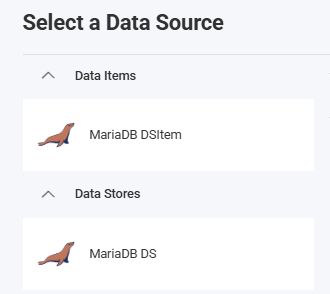
When the application runs, create a new Visualization and you will see the newly created MariaDB data source listed in the "Select a Data Source" dialog.

Creating Data Source Items
Data source items represent specific tables or datasets within your MariaDB data source that users can select for visualization. On the client side, you only need to specify ID, title, and subtitle.
revealView.onDataSourcesRequested = (callback) => {
    // Create the data source
    const mariadbDS = new $.ig.RVMariaDBDataSource();
    mariadbDS.title = "My MariaDB Datasource";
    mariadbDS.subtitle = "MariaDB";

    // Create a data source item
    const mariadbDSI = new $.ig.RVMariaDBDataSourceItem(mariadbDS);
    mariadbDSI.id = "mariadb_sales_data";
    mariadbDSI.title = "My MariaDB Datasource Item";
    mariadbDSI.subtitle = "MariaDB";

    callback(new $.ig.RevealDataSources([mariadbDS], [mariadbDSI], true));
};
When the application runs, create a new Visualization and you will see the newly created MariaDB data source item listed in the "Select a Data Source" dialog.
MariaDB is MySQL-compatible, and it is common for drivers and error messages to reference MySQL even when connected to MariaDB.
Additional Resources
API Reference
- ASP.NET
- Node.js
- RVMariaDBDataSource - Represents a MariaDB data source
- RVMariaDBDataSourceItem - Represents a MariaDB data source item
- RVMariaDBDataSource - Represents a MariaDB data source
- RVMariaDBDataSourceItem - Represents a MariaDB data source item