行レベル セキュリティ
行レベル セキュリティ (RLS) は、各ユーザーがデータ ソースのどの行を読み取れるかを制御します。データ ソース項目に対して、「行の TenantId がユーザーのテナントと等しくなければならない」などの行フィルターをサーバー上で定義すると、Reveal はその項目を読み取るすべてのクエリ (表示形式、合計、ダッシュボード フィルターの値、ブレンドされたデータ、エクスポート) にそのフィルターを適用します。すべてのユーザーが同じダッシュボードを開きますが、表示されるのは自分の行のみです。
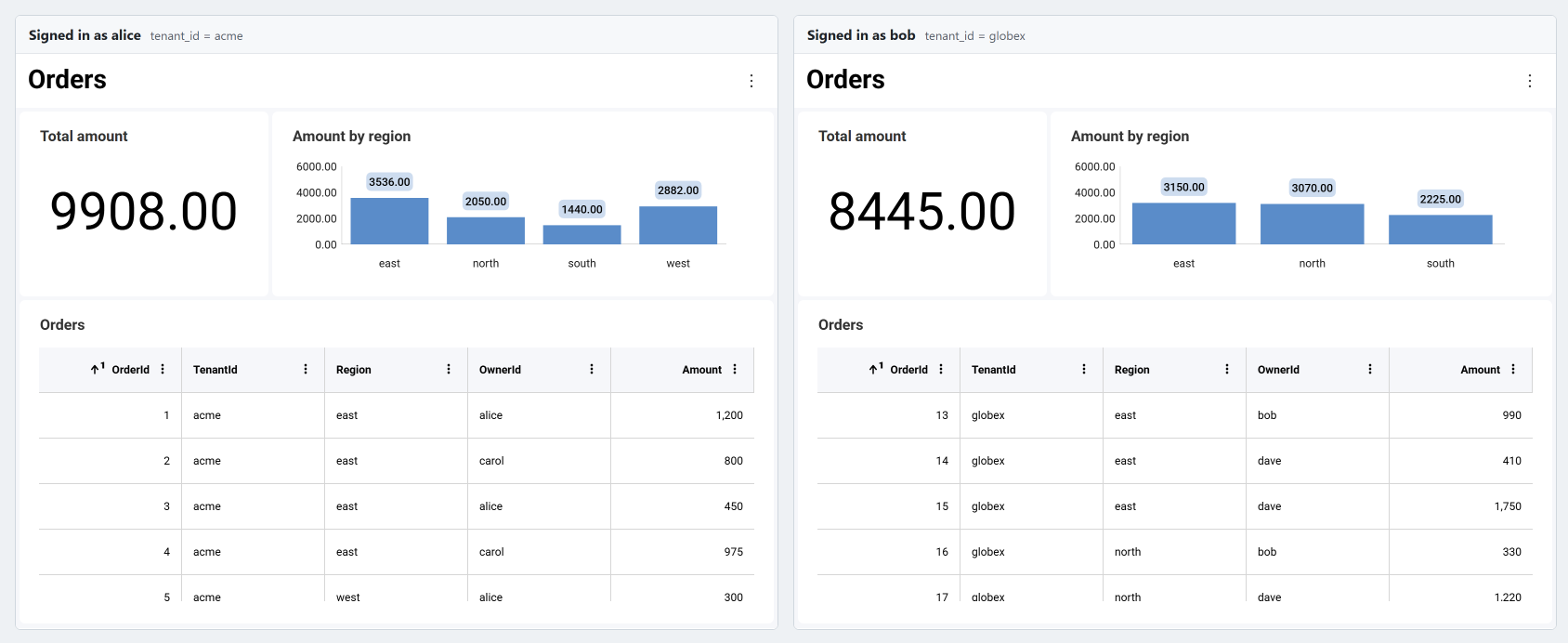
仕組み
フィルターは、現在のリクエストのユーザー コンテキスト (ユーザー ID、ロール、およびサインインしたユーザーについてサーバーが把握しているその他の値 (クレーム)) を使用して、データ ソース プロバイダーで設定します。
- フィルターはサーバー上に留まります。 フィルターがクライアントに送信されることはなく、クライアントが何を送信しても、フィルターを削除したり置き換えたりすることはできません。
- フィルターはすべての集計の前に実行されます。 ほとんどのデータベース項目では、フィルターはクエリの
WHERE句の一部になります。合計、ピボットの総計、フィルター値のリスト、ブレンドされたデータは、ユーザーが参照できる行のみから計算されます。 - 値はクエリ パラメーターとして送信されます。 ユーザー コンテキストの値がクエリ テキストに連結されることはないため、値によってクエリが変更されることはありません。
- キャッシュはフィルターを考慮します。 結果はフィルター値ごとにキャッシュされるため、あるユーザー向けに計算された結果が、フィルター値の異なるユーザーに提供されることはありません。
- フェールクローズで動作します。 必要な値がないなど、フィルターを適用できない場合は、フィルターされていない行を返すのではなく、リクエストが失敗します。
要件
行レベル セキュリティは、バージョン 2.3.0 以降の ASP.NET、Java、Node.js サーバー SDK で使用できます。機能フラグや設定、追加のパッケージは必要なく、クライアント API もありません。行レベル セキュリティはすべてサーバー上で構成し、クライアント コードを変更する必要はありません。行レベル セキュリティは行フィルターを指定したデータ ソース項目にのみ適用され、その他の項目はこれまでとまったく同じようにクエリされます。
- サポートされるデータ ソース。 行フィルターは表形式のデータ ソース項目に適用されます。対象となるのは、テーブル、ビュー、カスタム クエリ、ストアド プロシージャーなどのデータベース項目と、CSV、Excel、JSON のファイル項目です。項目のデータ ソースは、データ ソース別の機能サポートに記載されているものである必要があります。その他のデータ ソースの項目にも行フィルターを設定できますが、その項目を読み取るリクエストはすべて "Row-level security is only available on Engine2, and this request cannot run on it" というエラーで失敗します。行フィルターを持つ項目を読み取る表示形式が、その他のデータ ソースをブレンドしている場合や、入れ替えたデータを使用している場合も、同じエラーで失敗します。
Engine2Enabled設定を有効のままにすること。 このサーバー設定はデフォルトで有効です (ASP.NET ではEngine2Enabled、Java ではsetEngine2Enabled、Node.js ではengine2Enabledオプション)。無効にすると、行フィルターを持つ項目を読み取るリクエストはすべて同じエラーで失敗します。
行レベル セキュリティの設定
手順 1 - フィルターに必要な値をユーザー コンテキストに格納します。
これらの値は、認証によってすでに確立されている ID から読み取ってください。ユーザー コンテキストの各プロパティは、フィルターが名前で読み取ることのできる値です。ロールは、定義済みの Roles プロパティに格納されます。
- ASP.NET
- Java
- Node.js
- Node.js - TS
public class UserContextProvider : IRVUserContextProvider
{
    public IRVUserContext GetUserContext(HttpContext aspnetContext)
    {
        // The signed-in user, as your authentication middleware established it
        var user = aspnetContext.User;

        var properties = new Dictionary<string, object>
        {
            ["tenant_id"] = user.FindFirstValue("tenant_id"),
            ["regions"] = user.FindAll("region").Select(c => c.Value).ToArray(),
        };

        return new RVUserContext(user.FindFirstValue(ClaimTypes.NameIdentifier), properties)
        {
            Roles = user.FindAll(ClaimTypes.Role).Select(c => c.Value).ToArray()
        };
    }
}
public class UserContextProvider implements IRVServletUserContextProvider {
    @Override
    public IRVUserContext getUserContext(HttpServletRequest request) {
        // The signed-in user, as your authentication layer established it; AppUser is your own user model
        AppUser user = users.find(request.getUserPrincipal().getName());

        RVUserContext userContext = new RVUserContext(user.getId());
        userContext.setClaim("tenant_id", user.getTenantId());
        userContext.setClaim("regions", user.getRegions()); // a List<String>
        userContext.setRoles(user.getRoles());              // a String[]
        return userContext;
    }
}
const userContextProvider = (request) => {
  // The signed-in user, as your authentication middleware established it
  const user = request.user;

  const userContext = new reveal.RVUserContext(user.id, new Map());
  userContext.setClaim("tenant_id", user.tenantId);
  userContext.setClaim("regions", user.regions); // an array of strings
  userContext.roles = user.roles;
  return userContext;
};
const userContextProvider = (request: IncomingMessage) => {
  // The signed-in user, as your authentication middleware established it
  const user = (request as any).user;

  const userContext = new RVUserContext(user.id, new Map<string, Object>());
  userContext.setClaim("tenant_id", user.tenantId);
  userContext.setClaim("regions", user.regions); // an array of strings
  userContext.roles = user.roles;
  return userContext;
};
値には、文字列、数値、ブール値、日付を指定できます。後述の複数値フィルターでは、これらのコレクションを指定することもできます。UserId という名前は予約されています。UserId を読み取るフィルターは、常にユーザー コンテキストのユーザー ID を取得します。
setAdditionalHeadersProvider で設定したヘッダーなど、この目的のためにクライアントが送信する値からユーザー コンテキストを設定しないでください。これらの値はブラウザーで誰でも変更でき、他のユーザーの行を読み取ることができてしまいます。認証 Cookie、検証済みのトークン、独自のセッション ストアなど、サーバーが検証した ID を使用してください。
手順 2 - データ ソース プロバイダーで、データ ソース項目に行フィルターを設定します。
プロバイダーが受け取るデータ ソース項目は、クライアントから送信されたものです。そのため、プロバイダーの両方のメソッドを許可リストとして実装してください。アプリケーションが提供するデータ ソースと項目のみを返し、それ以外に対しては例外をスローします。null を返すと、項目はクライアントが送信したとおりのまま保持されます。フィルターを設定する前に、データベース項目のテーブル、スキーマ、カスタム クエリ、ストアド プロシージャーなど、項目が読み取る内容を決定するすべてのプロパティを、サーバー側の値を使用して設定します。テーブル名やファイル パスなど、リクエストに含まれる値は、使用する前に独自の値にマッピングしてください。
CSV、Excel、JSON の項目については、ファイル データ ソースの保護で説明しているように、プロバイダーはそのリソース項目に対しても自身を呼び出します。
- ASP.NET
- Java
- Node.js
- Node.js - TS
public class DataSourceProvider : IRVDataSourceProvider
{
    private static readonly string[] Tables = { "Orders", "Customers" };

    public async Task<RVDataSourceItem> ChangeDataSourceItemAsync(IRVUserContext userContext, string dashboardId, RVDataSourceItem dataSourceItem)
    {
        await ChangeDataSourceAsync(userContext, dataSourceItem.DataSource);

        if (dataSourceItem is RVResourceBasedDataSourceItem resourceBasedItem)
        {
            await ChangeDataSourceItemAsync(userContext, dashboardId, (RVDataSourceItem)resourceBasedItem.ResourceItem);
        }

        if (dataSourceItem is RVSqlServerDataSourceItem sqlItem)
        {
            // Decide on the server what the item reads
            var table = Tables.FirstOrDefault(t => string.Equals(t, sqlItem.Table, StringComparison.OrdinalIgnoreCase))
                ?? throw new InvalidOperationException($"Table '{sqlItem.Table}' is not available.");
            sqlItem.Schema = "dbo";
            sqlItem.Table = table;
            sqlItem.CustomQuery = null;
            sqlItem.Procedure = null;

            // Every row the user reads from the table must belong to their tenant
            sqlItem.RowFilter = RowFilter.FieldEqualsContext("TenantId", "tenant_id");
            return sqlItem;
        }

        // Refuse every item your application doesn't serve
        throw new InvalidOperationException("This data source item is not available.");
    }

    public Task<RVDashboardDataSource> ChangeDataSourceAsync(IRVUserContext userContext, RVDashboardDataSource dataSource)
    {
        if (dataSource is RVSqlServerDataSource sqlServer)
        {
            // Set the host and database from your server's configuration
            sqlServer.Host = "db.example.com";
            sqlServer.Database = "Sales";
            return Task.FromResult(dataSource);
        }

        // Refuse every data source your application doesn't serve
        throw new InvalidOperationException("This data source is not available.");
    }
}
public class DataSourceProvider implements IRVDataSourceProvider {
    private static final List<String> TABLES = List.of("Orders", "Customers");

    public RVDataSourceItem changeDataSourceItem(IRVUserContext userContext, String dashboardId, RVDataSourceItem dataSourceItem) {
        changeDataSource(userContext, dataSourceItem.getDataSource());

        if (dataSourceItem instanceof RVResourceBasedDataSourceItem resourceBasedItem) {
            changeDataSourceItem(userContext, dashboardId, (RVDataSourceItem) resourceBasedItem.getResourceItem());
        }

        if (dataSourceItem instanceof RVSqlServerDataSourceItem sqlItem) {
            // Decide on the server what the item reads
            String table = TABLES.stream()
                .filter(t -> t.equalsIgnoreCase(sqlItem.getTable()))
                .findFirst()
                .orElseThrow(() -> new IllegalArgumentException("Table '" + sqlItem.getTable() + "' is not available."));
            sqlItem.setSchema("dbo");
            sqlItem.setTable(table);
            sqlItem.setCustomQuery(null);
            sqlItem.setProcedure(null);

            // Every row the user reads from the table must belong to their tenant
            sqlItem.setRowFilter(RowFilter.fieldEqualsContext("TenantId", "tenant_id"));
            return sqlItem;
        }

        // Refuse every item your application doesn't serve
        throw new IllegalArgumentException("This data source item is not available.");
    }

    public RVDashboardDataSource changeDataSource(IRVUserContext userContext, RVDashboardDataSource dataSource) {
        if (dataSource instanceof RVSqlServerDataSource sqlServer) {
            // Set the host and database from your server's configuration
            sqlServer.setHost("db.example.com");
            sqlServer.setDatabase("Sales");
            return sqlServer;
        }

        // Refuse every data source your application doesn't serve
        throw new IllegalArgumentException("This data source is not available.");
    }
}
const TABLES = ["Orders", "Customers"];

const dataSourceItemProvider = async (userContext, dataSourceItem) => {
  await dataSourceProvider(userContext, dataSourceItem.dataSource);

  if (dataSourceItem instanceof reveal.RVResourceBasedDataSourceItem) {
    await dataSourceItemProvider(userContext, dataSourceItem.resourceItem);
  }

  if (dataSourceItem instanceof reveal.RVSqlServerDataSourceItem) {
    // Decide on the server what the item reads
    const table = TABLES.find(t => t.toLowerCase() === String(dataSourceItem.table).toLowerCase());
    if (!table) {
      throw new Error(`Table '${dataSourceItem.table}' is not available.`);
    }
    dataSourceItem.schema = "dbo";
    dataSourceItem.table = table;
    dataSourceItem.customQuery = null;
    dataSourceItem.procedure = null;

    // Every row the user reads from the table must belong to their tenant
    dataSourceItem.rowFilter = reveal.RowFilter.fieldEqualsContext("TenantId", "tenant_id");
    return dataSourceItem;
  }

  // Refuse every item your application doesn't serve
  throw new Error("This data source item is not available.");
};

const dataSourceProvider = async (userContext, dataSource) => {
  if (dataSource instanceof reveal.RVSqlServerDataSource) {
    // Set the host and database from your server's configuration
    dataSource.host = "db.example.com";
    dataSource.database = "Sales";
    return dataSource;
  }

  // Refuse every data source your application doesn't serve
  throw new Error("This data source is not available.");
};
const TABLES = ["Orders", "Customers"];

const dataSourceItemProvider = async (userContext: IRVUserContext | null, dataSourceItem: RVDataSourceItem): Promise<RVDataSourceItem> => {
  await dataSourceProvider(userContext, dataSourceItem.dataSource);

  if (dataSourceItem instanceof RVResourceBasedDataSourceItem) {
    await dataSourceItemProvider(userContext, dataSourceItem.resourceItem as RVDataSourceItem);
  }

  if (dataSourceItem instanceof RVSqlServerDataSourceItem) {
    // Decide on the server what the item reads
    const table = TABLES.find(t => t.toLowerCase() === String(dataSourceItem.table).toLowerCase());
    if (!table) {
      throw new Error(`Table '${dataSourceItem.table}' is not available.`);
    }
    dataSourceItem.schema = "dbo";
    dataSourceItem.table = table;
    dataSourceItem.customQuery = null;
    dataSourceItem.procedure = null;

    // Every row the user reads from the table must belong to their tenant
    dataSourceItem.rowFilter = RowFilter.fieldEqualsContext("TenantId", "tenant_id");
    return dataSourceItem;
  }

  // Refuse every item your application doesn't serve
  throw new Error("This data source item is not available.");
};

const dataSourceProvider = async (userContext: IRVUserContext | null, dataSource: RVDashboardDataSource): Promise<RVDashboardDataSource> => {
  if (dataSource instanceof RVSqlServerDataSource) {
    // Set the host and database from your server's configuration
    dataSource.host = "db.example.com";
    dataSource.database = "Sales";
    return dataSource;
  }

  // Refuse every data source your application doesn't serve
  throw new Error("This data source is not available.");
};
データ ソースを設定する方法の詳細については、データ ソースの置き換えを参照してください。
手順 3 - 両方のプロバイダーを Reveal SDK に登録します。
- ASP.NET
- Java
- Node.js
- Node.js - TS
builder.Services.AddControllers().AddReveal(builder =>
{
    builder.AddUserContextProvider<UserContextProvider>();
    builder.AddDataSourceProvider<DataSourceProvider>();
});
RevealEngineServlet servlet = new RevealEngineServlet(
    new RevealServerBuilder()
        .setDataSourceProvider(new DataSourceProvider())
        .build(),
    new UserContextProvider());
const revealOptions = {
  userContextProvider: userContextProvider,
  dataSourceProvider: dataSourceProvider,
  dataSourceItemProvider: dataSourceItemProvider,
};
app.use('/', reveal(revealOptions));
const revealOptions: RevealOptions = {
  userContextProvider: userContextProvider,
  dataSourceProvider: dataSourceProvider,
  dataSourceItemProvider: dataSourceItemProvider,
};
app.use('/', reveal(revealOptions));
行フィルターのクラスは、ASP.NET では Reveal.Sdk.Data 名前空間、Java では io.revealbi.core.data パッケージにあり、Node.js では reveal-sdk-node からエクスポートされます。
行フィルターの種類
| フィルター | 保持される行 |
|---|---|
FieldEqualsContext(field, name) | フィールドがユーザー コンテキストの値 name と等しい行。 |
FieldInContext(field, name) | フィールドが、コレクションであるユーザー コンテキストの値 name のいずれかの値と一致する行。単一の値は、要素が 1 つのコレクションとして扱われます。 |
FieldEqualsValue(field, value) | フィールドが固定値と等しい行。 |
FieldInValues(field, values...) | フィールドが複数の固定値のいずれかと一致する行。 |
All(filters...) | すべてのフィルターが成立する行 (AND)。 |
Any(filters...) | 少なくとも 1 つのフィルターが成立する行 (OR)。 |
Expression(expression, parameters) | ダッシュボードの式言語で記述した条件が成立する行。 |
Java と Node.js では、名前は小文字で始まります (fieldEqualsContext、all、expression など)。フィールドはデータ ソースでの名前で指定し、名前の大文字と小文字は区別されます。フィールドがダッシュボードやその表示形式に含まれている必要はありません。Reveal はデータ ソースからフィールドを読み取ります。
- ASP.NET
- Java
- Node.js
- Node.js - TS
// The user's tenant, and either one of the user's regions or a row the user owns
RowFilter.All(
    RowFilter.FieldEqualsContext("TenantId", "tenant_id"),
    RowFilter.Any(
        RowFilter.FieldInContext("Region", "regions").WhenMissing(RowFilterMissing.DenyRows),
        RowFilter.FieldEqualsContext("OwnerId", "UserId")));
// The user's tenant, and either one of the user's regions or a row the user owns
RowFilter.all(
    RowFilter.fieldEqualsContext("TenantId", "tenant_id"),
    RowFilter.any(
        RowFilter.fieldInContext("Region", "regions").whenMissing(RowFilterMissing.DENY_ROWS),
        RowFilter.fieldEqualsContext("OwnerId", "UserId")));
// The user's tenant, and either one of the user's regions or a row the user owns
reveal.RowFilter.all(
  reveal.RowFilter.fieldEqualsContext("TenantId", "tenant_id"),
  reveal.RowFilter.any(
    reveal.RowFilter.fieldInContext("Region", "regions").whenMissing(reveal.RowFilterMissing.DenyRows),
    reveal.RowFilter.fieldEqualsContext("OwnerId", "UserId")));
// The user's tenant, and either one of the user's regions or a row the user owns
RowFilter.all(
  RowFilter.fieldEqualsContext("TenantId", "tenant_id"),
  RowFilter.any(
    RowFilter.fieldInContext("Region", "regions").whenMissing(RowFilterMissing.DenyRows),
    RowFilter.fieldEqualsContext("OwnerId", "UserId")));
式フィルター
式フィルターでは、計算フィールドと同じ言語を使用します。各 VARIABLE("name") は、まず式自体のパラメーターから値を読み取り、次にユーザー コンテキストから読み取ります。ユーザー コンテキストでは、UserId はユーザー ID を表します。
- ASP.NET
- Java
- Node.js
- Node.js - TS
// An expression, with a value of its own
RowFilter.Expression(
    "AND([TenantId] = VARIABLE(\"tenant_id\"), [Discount] < VARIABLE(\"max_discount\"))",
    new Dictionary<string, object> { ["max_discount"] = 0.25 });
// An expression, with a value of its own
RowFilter.expression(
    "AND([TenantId] = VARIABLE(\"tenant_id\"), [Discount] < VARIABLE(\"max_discount\"))",
    Map.of("max_discount", 0.25));
// An expression, with a value of its own
reveal.RowFilter.expression(
  'AND([TenantId] = VARIABLE("tenant_id"), [Discount] < VARIABLE("max_discount"))',
  { max_discount: 0.25 });
// An expression, with a value of its own
RowFilter.expression(
  'AND([TenantId] = VARIABLE("tenant_id"), [Discount] < VARIABLE("max_discount"))',
  { max_discount: 0.25 });
以下の点に注意してください。
- 値のない変数があると、リクエストは失敗します。他のフィルターとは異なり、式フィルターでは代わりに行を拒否することはできません。
- 変数名の大文字と小文字は区別されます。また、
_ig_rv_で始まる名前は予約されています。 SUMなどの集計関数は使用できません。- 式フィルターを
AllやAnyと組み合わせることはできません。代わりに、式の中でANDとORを使用して条件を組み合わせてください。 TODAY()やNOW()などの時間関数はクライアントが送信するタイム ゾーンを使用するため、これらの関数で指定した境界は最大で 1 日ずれる可能性があります。代わりに、日付をパラメーターとして渡してください。
ロールの除外と値がない場合の処理
ExemptRoles は、指定したロールのいずれかを持つユーザーに対してフィルターを解除します。ロールはユーザー コンテキストの Roles プロパティから読み取られ、大文字と小文字を区別して比較されます。Roles プロパティには、文字列のコレクションを格納する必要があります。単一の文字列など、それ以外の値が格納されている場合、ロールを除外するフィルターによってリクエストが失敗します。
デフォルトでは、現在のユーザーが持っていないユーザー コンテキストの値を読み取るフィルターは、リクエストを拒否します。この場合、表示形式にはデータではなくエラーが表示されます。代わりに行を表示しないようにするには、WhenMissing に DenyRows を指定します。
- ASP.NET
- Java
- Node.js
- Node.js - TS
// Administrators and auditors see every tenant
RowFilter.FieldEqualsContext("TenantId", "tenant_id").ExemptRoles("admin", "auditor");

RowFilter.FieldEqualsContext("TenantId", "tenant_id").WhenMissing(RowFilterMissing.DenyRows);
// Administrators and auditors see every tenant
RowFilter.fieldEqualsContext("TenantId", "tenant_id").exemptRoles("admin", "auditor");

RowFilter.fieldEqualsContext("TenantId", "tenant_id").whenMissing(RowFilterMissing.DENY_ROWS);
// Administrators and auditors see every tenant
reveal.RowFilter.fieldEqualsContext("TenantId", "tenant_id").exemptRoles("admin", "auditor");

reveal.RowFilter.fieldEqualsContext("TenantId", "tenant_id").whenMissing(reveal.RowFilterMissing.DenyRows);
// Administrators and auditors see every tenant
RowFilter.fieldEqualsContext("TenantId", "tenant_id").exemptRoles("admin", "auditor");

RowFilter.fieldEqualsContext("TenantId", "tenant_id").whenMissing(RowFilterMissing.DenyRows);
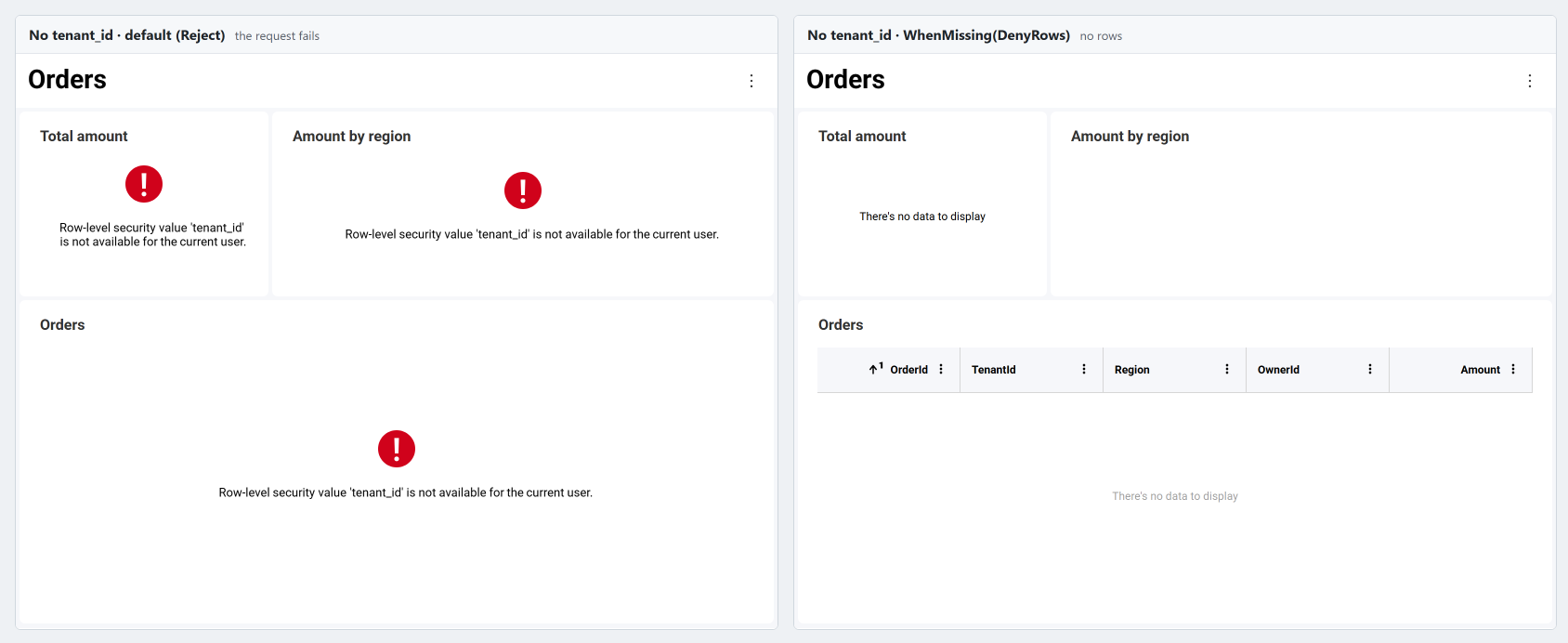
- ユーザー コンテキストにそのプロパティがない場合、またはプロパティの値が
nullか空のコレクションである場合、値はないものと見なされます。UserIdは、ユーザー ID が空の場合にないものと見なされます。 - 空の文字列は値であり、値がないものとは見なされません。
tenant_idが""のユーザーには、TenantIdが空の行が表示されます。値を持たないユーザーについては、プロパティを省略してください。 Anyの中では、DenyRowsを指定したフィルターはその行を許可しないだけで、他のフィルターは引き続き適用されます。前述の例で、リージョンを持たないユーザーでも自分が所有する行を参照できるのは、このためです。
フィルターは不変です。ExemptRoles と WhenMissing は新しいフィルターを返すため、フィルターを一度作成すれば、すべてのリクエストで再利用できます。
ファイル データ ソースの保護
CSV、Excel、JSON の項目は、ローカル ファイル項目などのリソース項目を介してファイルを読み取ります。行フィルターは、リソース項目ではなく、ファイルを読み取る項目に設定します。フィルターではファイル自体は保護されないため、リソース項目にも RawAccessForbidden を設定する必要があります。これにより、Reveal はフィルターされた項目を介してのみファイルを読み取り、ファイルのダウンロードや JSON 構造の参照など、ファイルをそのまま読み取るリクエストをすべて拒否します。行フィルターを持つ項目のリソース項目に RawAccessForbidden が設定されていない場合、その項目へのリクエストは失敗します。
プロバイダーはリソース項目を、単独で受け取る場合と、それを読み取る項目の中に含まれた状態で受け取る場合があります。以下のように、リソース項目に対してプロバイダーを呼び出して、どちらの場合も同じように処理してください。
- ASP.NET
- Java
- Node.js
- Node.js - TS
public async Task<RVDataSourceItem> ChangeDataSourceItemAsync(IRVUserContext userContext, string dashboardId, RVDataSourceItem dataSourceItem)
{
    await ChangeDataSourceAsync(userContext, dataSourceItem.DataSource);

    if (dataSourceItem is RVResourceBasedDataSourceItem resourceBasedItem)
    {
        // A CSV, Excel or JSON item: change the resource item that reads its file the same way
        await ChangeDataSourceItemAsync(userContext, dashboardId, (RVDataSourceItem)resourceBasedItem.ResourceItem);
    }

    if (dataSourceItem is RVLocalFileDataSourceItem file)
    {
        // The file holds every tenant's rows: never serve it as it is
        file.Uri = MapFile(file.Uri); // your own mapping to the files you serve; throws for any other
        file.RawAccessForbidden = true;
        return file;
    }

    if (dataSourceItem is RVCsvDataSourceItem csvItem)
    {
        // Every row the user reads from the file must belong to their tenant
        csvItem.RowFilter = RowFilter.FieldEqualsContext("TenantId", "tenant_id");
        return csvItem;
    }

    // Refuse every item your application doesn't serve
    throw new InvalidOperationException("This data source item is not available.");
}

public Task<RVDashboardDataSource> ChangeDataSourceAsync(IRVUserContext userContext, RVDashboardDataSource dataSource)
{
    // The data sources of the CSV item and of the local file item that reads its file
    if (dataSource is RVCsvDataSource || dataSource is RVLocalFileDataSource)
    {
        return Task.FromResult(dataSource);
    }

    // Refuse every data source your application doesn't serve
    throw new InvalidOperationException("This data source is not available.");
}
public RVDataSourceItem changeDataSourceItem(IRVUserContext userContext, String dashboardId, RVDataSourceItem dataSourceItem) {
    changeDataSource(userContext, dataSourceItem.getDataSource());

    if (dataSourceItem instanceof RVResourceBasedDataSourceItem resourceBasedItem) {
        // A CSV, Excel or JSON item: change the resource item that reads its file the same way
        changeDataSourceItem(userContext, dashboardId, (RVDataSourceItem) resourceBasedItem.getResourceItem());
    }

    if (dataSourceItem instanceof RVLocalFileDataSourceItem file) {
        // The file holds every tenant's rows: never serve it as it is
        file.setUri(mapFile(file.getUri())); // your own mapping to the files you serve; throws for any other
        file.setRawAccessForbidden(true);
        return file;
    }

    if (dataSourceItem instanceof RVCsvDataSourceItem csvItem) {
        // Every row the user reads from the file must belong to their tenant
        csvItem.setRowFilter(RowFilter.fieldEqualsContext("TenantId", "tenant_id"));
        return csvItem;
    }

    // Refuse every item your application doesn't serve
    throw new IllegalArgumentException("This data source item is not available.");
}

public RVDashboardDataSource changeDataSource(IRVUserContext userContext, RVDashboardDataSource dataSource) {
    // The data sources of the CSV item and of the local file item that reads its file
    if (dataSource instanceof RVCsvDataSource || dataSource instanceof RVLocalFileDataSource) {
        return dataSource;
    }

    // Refuse every data source your application doesn't serve
    throw new IllegalArgumentException("This data source is not available.");
}
const dataSourceItemProvider = async (userContext, dataSourceItem) => {
  await dataSourceProvider(userContext, dataSourceItem.dataSource);

  if (dataSourceItem instanceof reveal.RVResourceBasedDataSourceItem) {
    // A CSV, Excel or JSON item: change the resource item that reads its file the same way
    await dataSourceItemProvider(userContext, dataSourceItem.resourceItem);
  }

  if (dataSourceItem instanceof reveal.RVLocalFileDataSourceItem) {
    // The file holds every tenant's rows: never serve it as it is
    dataSourceItem.uri = mapFile(dataSourceItem.uri); // your own mapping to the files you serve; throws for any other
    dataSourceItem.rawAccessForbidden = true;
    return dataSourceItem;
  }

  if (dataSourceItem instanceof reveal.RVCsvDataSourceItem) {
    // Every row the user reads from the file must belong to their tenant
    dataSourceItem.rowFilter = reveal.RowFilter.fieldEqualsContext("TenantId", "tenant_id");
    return dataSourceItem;
  }

  // Refuse every item your application doesn't serve
  throw new Error("This data source item is not available.");
};

const dataSourceProvider = async (userContext, dataSource) => {
  // The data sources of the CSV item and of the local file item that reads its file
  if (dataSource instanceof reveal.RVCsvDataSource || dataSource instanceof reveal.RVLocalFileDataSource) {
    return dataSource;
  }

  // Refuse every data source your application doesn't serve
  throw new Error("This data source is not available.");
};
const dataSourceItemProvider = async (userContext: IRVUserContext | null, dataSourceItem: RVDataSourceItem): Promise<RVDataSourceItem> => {
  await dataSourceProvider(userContext, dataSourceItem.dataSource);

  if (dataSourceItem instanceof RVResourceBasedDataSourceItem) {
    // A CSV, Excel or JSON item: change the resource item that reads its file the same way
    await dataSourceItemProvider(userContext, dataSourceItem.resourceItem as RVDataSourceItem);
  }

  if (dataSourceItem instanceof RVLocalFileDataSourceItem) {
    // The file holds every tenant's rows: never serve it as it is
    dataSourceItem.uri = mapFile(dataSourceItem.uri); // your own mapping to the files you serve; throws for any other
    dataSourceItem.rawAccessForbidden = true;
    return dataSourceItem;
  }

  if (dataSourceItem instanceof RVCsvDataSourceItem) {
    // Every row the user reads from the file must belong to their tenant
    dataSourceItem.rowFilter = RowFilter.fieldEqualsContext("TenantId", "tenant_id");
    return dataSourceItem;
  }

  // Refuse every item your application doesn't serve
  throw new Error("This data source item is not available.");
};

const dataSourceProvider = async (userContext: IRVUserContext | null, dataSource: RVDashboardDataSource): Promise<RVDashboardDataSource> => {
  // The data sources of the CSV item and of the local file item that reads its file
  if (dataSource instanceof RVCsvDataSource || dataSource instanceof RVLocalFileDataSource) {
    return dataSource;
  }

  // Refuse every data source your application doesn't serve
  throw new Error("This data source is not available.");
};
Excel 項目や JSON 項目も提供する場合は、Excel 項目のシートと範囲、JSON 項目の列の構成もサーバー上で設定してください。データベース項目のテーブルと同様に、これらの設定によって、フィールド名がどの列を指すかが決まります。
サーバーでのダッシュボードのエクスポート
サーバーでダッシュボードをエクスポートする場合は、ユーザー コンテキストの提供で説明しているように、エクスポート メソッドにユーザー コンテキストを渡して、エクスポートにそのユーザーが参照する行が含まれるようにします。ユーザー コンテキストを渡さない場合、ユーザー コンテキストの値はすべてないものと見なされ、エクスポートは失敗するか、DenyRows を使用するフィルターの場合は行が含まれません。
ベスト プラクティス
- 値の型を列の型に合わせます。 テキスト列には文字列を、数値列には数値をユーザー コンテキストに格納します。型の異なる値はどの行とも一致しない可能性があり、変換に失敗すると、ユーザーが参照できない行の値を含むデータベース エラーが発生する可能性があります。
- データベースでの値の比較方法を把握します。 フィルターは、データ ソースの規則に従ってデータ ソース内で値を比較します。SQL Server と MySQL のデフォルトの照合順序では、
'acme'は'ACME'や'acme 'とも一致します。ファイル データ ソースでは、値は完全一致で比較されます。大文字と小文字や末尾のスペースのみが異なるキーは使用しないでください。 - データ ソース プロバイダーを高速に保ちます。 データ ソース プロバイダーはすべてのデータ リクエストで実行されるため、ユーザーの権限などの検索結果はキャッシュしてください。
制限事項
- 計算フィールド。 フィルターはデータ ソースのフィールドのみを読み取ります。計算フィールドを読み取ることはできません。
- カスタム クエリ。 カスタム クエリは、項目の行フィルターが読み取るすべてのフィールドを返す必要があります。
- データ モデル プロバイダー。 データ モデル プロバイダーでは、フィルターが読み取るフィールドを非表示にできません。プロバイダーが返すスキーマにそのフィールドを残してください。
- ストアド プロシージャー。 ストアド プロシージャーが返す行は、データベースではなく、プロシージャーの実行後に Reveal によってフィルターされます。プロシージャー自体で行をフィルターできる場合は、行フィルターを設定する代わりに、ユーザーの値をプロシージャーのパラメーターとして渡してください。