The Reveal SDK AI features are currently in beta, and we welcome your feedback to help us improve for the final release.
Please report any issues or suggestions through our support channels.
Installing the AI Server SDK
The Reveal SDK AI Server provides the backend services needed to power AI features in your applications. It integrates with LLM providers and manages AI operations like insight generation, dashboard creation, and conversational analytics.
Prerequisites
Before installing the AI Server SDK, ensure you have:
- The base Reveal SDK Server installed and configured
- .NET 8.0 or higher
- Access to at least one LLM provider (OpenAI, Anthropic, Google, etc.)
- LLM provider API keys configured
Installation Methods
ASP.NET Core
The AI Server SDK for ASP.NET Core is distributed as a NuGet package.
Step 1: Install the NuGet Package
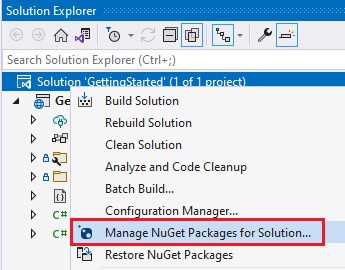
Right-click your Solution or Project and select Manage NuGet Packages for Solution.
In the package manager dialog, open the Browse tab and install the Reveal.Sdk.AI.AspNetCore NuGet package into your project.
Package Name: Reveal.Sdk.AI.AspNetCore
Or using the Package Manager Console:
Install-Package Reveal.Sdk.AI.AspNetCore
Or using the .NET CLI:
dotnet add package Reveal.Sdk.AI.AspNetCore
Step 2: Configure Services
Open and modify the Program.cs file to add the AI services. The AI SDK extends the base Reveal SDK, so you need both configured:
using Reveal.Sdk;
using Reveal.Sdk.AI;

var builder = WebApplication.CreateBuilder(args);

// Add Reveal SDK (required)
builder.Services.AddControllers().AddReveal();

// Add Reveal AI services
builder.Services.AddRevealAI();

var app = builder.Build();
app.Run();
Step 3: Configure LLM Provider
Configure at least one LLM provider. Add this configuration after AddRevealAI():
For OpenAI:
builder.Services.AddRevealAI()
    .ConfigureOpenAI(options =>
    {
        options.ApiKey = builder.Configuration["OpenAI:ApiKey"];
        options.ModelId = "gpt-4-.1";
    });
For Azure OpenAI:
builder.Services.AddRevealAI()
    .ConfigureAzureOpenAI(options =>
    {
        options.ApiKey = builder.Configuration["AzureOpenAI:ApiKey"];
        options.Endpoint = "https://yoururl.openai.azure.com/";
        options.DeploymentName = "gpt-4o";
    });
For Anthropic Claude:
builder.Services.AddRevealAI()
    .ConfigureAnthropic(options =>
    {
        options.ApiKey = builder.Configuration["Anthropic:ApiKey"];
        options.ModelId = "claude-sonnet-4-5";
    });
Step 4: Store API Keys Securely
Store your LLM provider API keys in appsettings.json or User Secrets:
{
  "OpenAI": {
    "ApiKey": "sk-your-api-key-here"
  },
  "Anthropic": {
    "ApiKey": "sk-ant-your-api-key-here"
  },
  "AzureOpenAI": {
    "ApiKey": "your-azure-api-key-here"
  }
}
Never commit API keys to source control. Always use environment variables, User Secrets, or a secure key management service.
Complete Example
Here's a complete Program.cs with AI features configured:
using Reveal.Sdk;
using Reveal.Sdk.AI;

var builder = WebApplication.CreateBuilder(args);

// Add CORS for cross-origin requests
builder.Services.AddCors(options =>
{
    options.AddDefaultPolicy(policy =>
    {
        policy.WithOrigins("http://localhost:4200")
              .AllowAnyMethod()
              .AllowAnyHeader();
    });
});

// Add base Reveal SDK
builder.Services.AddControllers().AddReveal(revealBuilder =>
{
    revealBuilder.AddSettings(settings =>
    {
        settings.LocalFileStoragePath = "Data";
    });
});

// Add Reveal AI with OpenAI provider
builder.Services.AddRevealAI()
    .ConfigureOpenAI(options =>
    {
        options.ApiKey = builder.Configuration["OpenAI:ApiKey"];
        options.ModelId = "gpt-4.1";
    });

var app = builder.Build();

app.UseCors();
app.MapControllers();

app.Run();
Node.js (Coming Soon)
Node.js support for the AI Server SDK is under development and will be available in a future release.
For now, ASP.NET Core is the recommended server platform for AI features.
Java (Coming Soon)
Java support for the AI Server SDK is under development and will be available in a future release.
For now, ASP.NET Core is the recommended server platform for AI features.
Verify Installation
After installation, verify the AI SDK is properly configured:
Step 1: Run Your Application
dotnet run
Step 2: Check AI Endpoints
The AI SDK adds several endpoints under /api/reveal/ai/:
Test the providers endpoint:
curl http://localhost:5000/api/reveal/ai/providers
Expected response:
{
  "providers": ["openai", "anthropic"]
}