Installing the Server SDK
ASP.NET
The steps below describe how to install the Reveal SDK into an existing ASP.NET Core project.
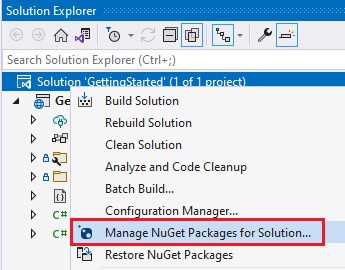
1 - Right click the Solution, or Project, and select Manage NuGet Packages for Solution.
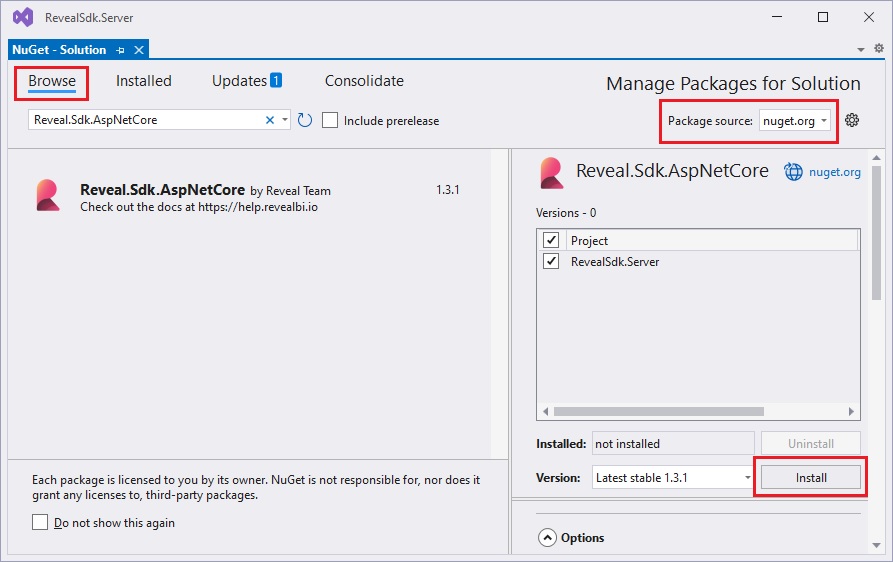
2 - In the package manager dialog, open the Browse tab, select the nuget.org package source, or the Infragistics (Local) package source is available, and install the Reveal.Sdk.AspNetCore NuGet package into the project.
3 - Open and modify the Program.cs file to add the namespace using Reveal.Sdk;. Then, add the call to IMcvBuilder.AddReveal() to the existing builder.Services.AddControllers() method as follows:
using Reveal.Sdk;

builder.Services.AddControllers().AddReveal();
4 - Right-click the project and select Add -> New Folder. The folder MUST be named Dashboards .
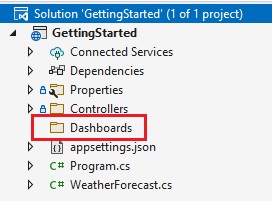
By default, the Reveal SDK uses a convention that will load all dashboards from the Dashboards folder. You can change this convention by creating a custom IRVDashboardProvider. You can learn more about this in the Loading Dashboards topic.
Node.js
1 - Install the Reveal SDK for Node.js
- npm
- Yarn
- pnpm
- Bun
npm install reveal-sdk-node
yarn add reveal-sdk-node
pnpm add reveal-sdk-node
bun add reveal-sdk-node
2 - Modify the main.js file to add Reveal
var express = require('express');
var reveal = require('reveal-sdk-node');

const app = express();

app.use('/', reveal());

app.listen(8080, () => {
	console.log(`Reveal server accepting http requests`);
});
3 - In Visual Studio Code, click the New Folder button in the Explorer and name it dashboards. The folder MUST be named dashboards
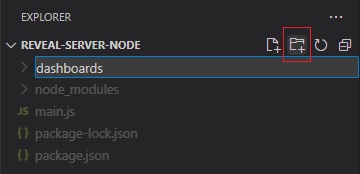
By default, the Reveal SDK uses a convention that will load all dashboards from the dashboards folder. You can change this convention by creating a custom IRVDashboardProvider.
Java
The steps below describe how to install the Reveal SDK into an existing Java application.
The Java SDK requires Java 17 or higher and a Jakarta EE 9 compliant server. Supported platforms are Windows, Linux, and macOS, in both x64 and ARM64 for all three. Also, if you use Jetty as your server, its version might conflict with the Jetty version used internally by Reveal SDK, which is currently 12.0.12.
1 - Update the pom.xml file, and add the Reveal Maven repository.
<repositories>
    <repository>
        <id>reveal.public</id>
        <url>https://maven.revealbi.io/repository/public</url>
    </repository>
</repositories>
2 -Add the Reveal SDK as a dependency.
<dependency>
    <groupId>io.revealbi</groupId>
    <artifactId>reveal-sdk-servlet</artifactId>
    <version>2.2.0</version>
</dependency>
Spring Boot
Register RevealEngineServlet as a Spring Boot servlet. Replace the sample provider classes with your application's implementations. If you need to pass request-based properties to the user context, replace null with a Properties object built from the request.
@SpringBootApplication
public class Application {

    public static void main(String[] args) {
       SpringApplication.run(Application.class, args);
    }

    @Bean
    ServletRegistrationBean<RevealEngineServlet> revealServlet() {
       RevealEngineServlet revealEngineServlet = new RevealEngineServlet(() -> new RevealServerBuilder()
                // Replace these sample providers with your application's implementations.
                .setAuthenticationProvider(new MyIRVAuthenticationProvider())
                .setDashboardProvider(new RVDashboardProvider("c:\\your-path"))
                .setDataSourceProvider(new MyIRVDataSourceProvider())
                .addSettings(settings -> {
                    // settings.setLicense("your license or remove to use ~/.revealbi-sdk/license.key");
                })
                .build(), request -> new RVUserContext("whatever", null /* replace null with a Properties built from the request if needed */));

       return new ServletRegistrationBean<>(revealEngineServlet, "/reveal-api/*");
    }
}
Tomcat
Use a Jakarta EE 9 compliant servlet container, such as Tomcat 10 or later. Create a ServletContextListener class and register RevealEngineServlet. Replace the sample provider classes with your application's implementations. If you need to pass request-based properties to the user context, replace null with a Properties object built from the request.
@WebListener
public class AppInitializer implements ServletContextListener {

	@Override
	public void contextInitialized(ServletContextEvent sce) {
        RevealEngineServlet revealEngineServlet = new RevealEngineServlet(() -> new RevealServerBuilder()
                // Replace these sample providers with your application's implementations.
                .setAuthenticationProvider(new MyIRVAuthenticationProvider())
                .setDashboardProvider(new RVDashboardProvider("c:\\your-path"))
                .setDataSourceProvider(new MyIRVDataSourceProvider())
                .addSettings(settings -> {
                    // settings.setLicense("your license or remove to use ~/.revealbi-sdk/license.key");
                })
                .build(), request -> new RVUserContext("whatever", null /* replace null with a Properties built from the request if needed */));

        ServletRegistration.Dynamic reg = sce.getServletContext().addServlet("myServlet", revealEngineServlet);
        reg.setAsyncSupported(true);
        reg.addMapping("/reveal-api/*");
	}
}