Setting up the Reveal SDK Server with Node.js and TypeScript
Step 1 - Create the Node.js Project
1 - Open a command line and create a directory named reveal-server-node
mkdir reveal-server-node
2 - Change the command line path to the newly created directory
cd reveal-server-node
3 - Initialize npm in the directory
- npm
- Yarn
- pnpm
- Bun
npm init -y
yarn init -y
pnpm init -y
bun init -y
4 - Install the express framework
- npm
- Yarn
- pnpm
- Bun
npm install express
yarn add express
pnpm add express
bun add express
5 - Install TypeScript and other package types.
- npm
- Yarn
- pnpm
- Bun
npm install typescript @types/node @types/express @types/cors --save-dev
yarn add typescript @types/node @types/express @types/cors --dev
pnpm add typescript @types/node @types/express @types/cors --save-dev
bun add typescript @types/node @types/express @types/cors --dev
6 - Install Nodemon and ts-node packages.
- npm
- Yarn
- pnpm
- Bun
npm install nodemon ts-node --save-dev
yarn add nodemon ts-node --dev
pnpm add nodemon ts-node --save-dev
bun add nodemon ts-node --dev
7 - Configure TypeScript. In this example, we are setting the root directory to "src" and the output directory to "dist".
npx tsc --init --rootDir src --outDir dist
8 - Open the project in VS Code
code .
9 - Create a new file named app.ts in a directory called src
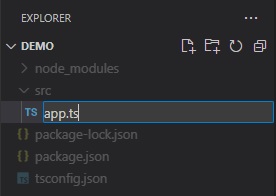
Add the following code:
import express, { Application } from 'express';

const app: Application = express();

app.listen(5111, () => {
	console.log(`Reveal server accepting http requests`);
});
Step 2 - Add Reveal SDK
1 - Install the Reveal SDK for Node.js
- npm
- Yarn
- pnpm
- Bun
npm install reveal-sdk-node
yarn add reveal-sdk-node
pnpm add reveal-sdk-node
bun add reveal-sdk-node
2 - Modify the app.ts file to add Reveal
import express, { Application } from 'express';
import reveal from 'reveal-sdk-node';

const app: Application = express();

app.use("/", reveal());

app.listen(5111, () => {
	console.log(`Reveal server accepting http requests`);
});
Step 3 - Create the Dashboards Folder
1 - In Visual Studio Code, click the New Folder button in the Explorer and name it dashboards. The folder MUST be named dashboards and created in the working directory of the application.
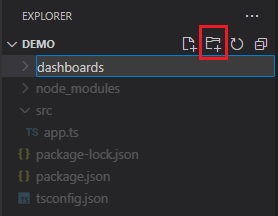
By default, the Reveal SDK uses a convention that will load all dashboards from the dashboards folder. You can change this convention by creating a custom IRVDashboardProvider.
Step 4 - Setup CORS Policy (Debugging)
While developing and debugging your application, it is common to host the server and client app on different URLs. For example; your Server my be running on https://localhost:24519, while your Angular app may be running on https://localhost:4200. If you were to try and load a dashboard from the client application, it would fail because of a Cross-Origin Resource Sharing (CORS) policy. To enable this scenario, you must create a CORS policy and enable it in the server project.
1 - Install cors package and the TypeScript types.
- npm
- Yarn
- pnpm
- Bun
npm install cors
npm install @types/cors --save-dev
yarn add cors
yarn add @types/cors --dev
pnpm add cors
pnpm add @types/cors --save-dev
bun add cors
bun add @types/cors --dev
2 - Modify the app.ts file to enable cors
import express, { Application } from 'express';
import reveal from 'reveal-sdk-node';
import cors from "cors";

const app: Application = express();

app.use(cors());

app.use("/", reveal());

app.listen(5111, () => {
	console.log(`Reveal server accepting http requests`);
});
Step 5 - Start the Node.js Server
The final step is to start the Node.js server by runnning the following command:
npx nodemon src/app.ts
Optionally you can add the following scripts to the package.json file.
"scripts": {
  "start": "node dist/app.js", //runs the app.js file in the dist folder that was generated from the build script
  "dev": "npx nodemon src/app.ts", //runs the server and watches for changes during development
  "build": "tsc -p .", //builds the app and generates javascript files in the dist folder
},
Then execute the dev script during development.
- npm
- Yarn
- pnpm
- Bun
npm run dev
yarn dev
pnpm run dev
bun run dev
The source code to this sample can be found on GitHub.